Friday, 6 May 2016

Android and Visual Studio 2015, THE FIX!

Few of you like me would have tried to get Visual Studio 2015 working with the Android project. The C# projects do work but it is the C++ project that causes a number of grief. There are many things that could be causing your issue, and this write-up is about how I fixed mine. Hence, it may also be right for you. Feel free to add any more comments and suggestions that have worked for you, to add to the pool of information that helps solve this.


There is also the case of installing Visual Studio 2015 and finding that your previously installed Android virtual machines under Android Virtual Device manager (AVD Manager) no longer works because HAXM will not load. I covered that here: Intel, Android Emulator, Hyper-V and HAXM. What's going on?

Not only does it cause the above problem, Visual Studio 2015 itself does not work "out of the box" for the C++ Android openGL ES project and it is something I talked about here: "Microsoft And Google: When Worlds Collide"

The typical symptoms of Visual Studio not working are:

  • Everything else non Android works.
  • Android cross platform VC++ project for openGLES creates the Project OK
  • Above project does not compile.
  • You get Error from Ant saying it exited with some code.
  • You get an error saying CLang.exe could not be located.
  • Your Visual Studio Emulator does not launch. May complain about not able to connect to UDP.
First un-install Visual Studio 2015 and all its components. The easiest way is to use "TotalUnInstaller" provided by Microsoft on Git to do it for you. Be aware that this tool will remove "other" visual studio editions listed in its documentation as well.
First download and install the Java JDK. Ant needs tools.jar from it and the latest version at time of this writing is "JDK 8U92" can be installed on any drive with the tools.jar still getting installed.
Which brings me to the point of why not let Visual studio installer install it?
VS2015 installer lists an older version of java and installs it on your C: drive. In the age of expensive SSD's you normally want things installed on your data drive instead. Even the Android SDK and NDK from within Visual Studio is installed on the C: drive and any consequent images you create(which will be fairly large) will go on your C drive. Given that, we have now covered that you should download and install Java JDK yourself.

Next is to un-install Hyper V through control panel/programs and features/"turn windows features on or off". Just un-tick the Hyper V, your PC will need to reboot after it has finished uninstalling Hyper-V.

I am covering INTeL CPU's because that is what I have and thus there is a good reason for doing the above step. You will download and install the Android SDK but that will fail to install the Android Virtual machine as a result of Hyper-V being on. It relies on HAXM which Hyper-V interferes with so HAXM will not install. You should create a Android Emulator and make sure it works before proceeding. If it does not work, you need to sort that out first! Also note that HAXM will not necessarily be installed by default so you will need to go to the SDK directory and start SDK Manager. You can install HAXM from here.


To see the screen above, you will need to download and install Android Studio. Once installed, go to the folder you installed the SDK and launch "SDK Manager".

Select and install HAXM.
Seperately from the SDK, download and install the Android NDK.

You can now start Android Studio and then once you have tested that Android studio works, Re-install Hyper V through the same process as uninstalling it, except this time tick the Hyper-V checkbox. you will need to reboot your system.

Install ANT. which at time of writing was up to 1.9.7.

DO NOT launch Android Studio or Android Emulator after reboot.

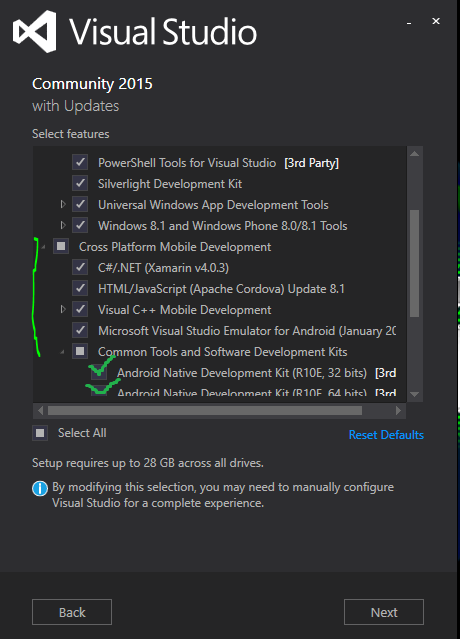
Install Visual Studio with all the cross platform option and sub options under that checked. This includes Android development kits.
You can install VS in any drive but a fair few files will still be installed on your C drive including the Android SDK. You can remove the Android SDK from VS later but at the moment we are installing it so that if you cannot get it working with the separately installed SDK, you can fall back to using the VS one.

Once Visual studio has intalled, start a VC++ Cross platform project and choose the Android and IOS only option for openGL ES app. SET the debug platform to x86. Do a "Rebuild" on the "[yourappname].Android.Packaging" project (right click, rebuild). If you do  not see errors, and rebuild succeeds, you don't need this fix as your one works great out of box. However you are likely to see errors such as "Ant exited with Code 1" or "Unable to locate CLang.exe".
Exit VS and start it up again but remain at the landing page. Click Tools and options. We will now set the Environment paths. Note that you do not have to set this from Windows System option.


Note that While in the above screenshot I am only changing the path to the Android NDK. In actuality, before the screenshot, I changed the other two as well!

Once done, it should look like the screenshot below:
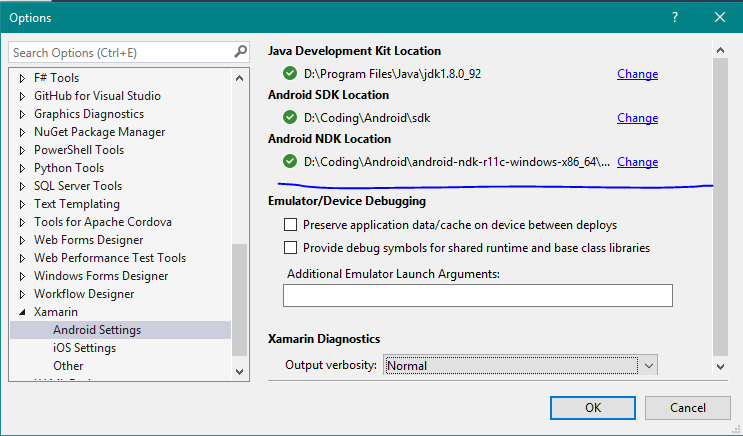

Although I am showing this for the VC++ project, this will fix this for the Xamarin projects running under C# but I thought to show you this since we are in the same screen.

What we actually need to fix now is the paths for VC++ and the Apache Cordova Android SDK paths.


As in the screenshot above, it is found in the branch "Tools for Apache Cordova" and selecting "Environment Variable Overrides"

Fix the ones here so they point to where you have, previously,  installed ANT, Android SDK, and Java. The blue X's mark an example of what VS shows if it cannot find your kit.

We now need to fix the Cross platform paths for  VC++. Expand the branch for "Cross Platform Tools", then "C++", and finally "Android" as shown in screenshot below:
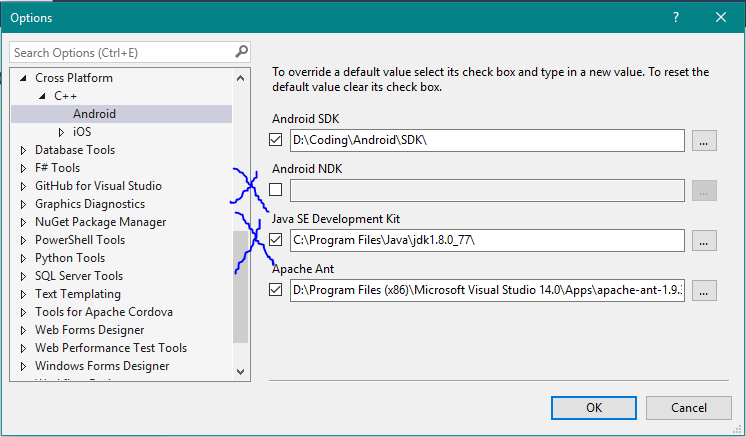

Change all the paths in the screenshot above as needed. The blue X's mark items of particular interest. Firstly the Android NDK is grayed out because VS is using the default one. Place a tick in the checkbox and choose the path where you installed the NDK from earlier. Similarly the Java path is pointing to the old version VS installed so you need to change this to the version you installed earlier.

Next, open the project you created earlier, and Rebuild. If it still gives an error regarding ANT then you may need to  manually change the Android Manifest file. You will need to change the Version to the SDK Version you have installed through the SDK Manager. Such as version 19 -which is what I am using.
 
Change the version appropriately as in the above screenshot marked with arrow and underline.
For the heads up on this being the SDK version not the target version, thanks go to Robert Donaldson. Hours of madness solved in a minute, thanks Robert!

The project should successfully rebuild now. If it fails, you may not have the latest Visual Studio Apache Cordova update. In this case look at your VS notifications and it should be listed there as an update (the purple flag on the top right of your Visual Studio Window). Install the update and re-launch your project. It should build then.

Next step is to create the Visual Studio emulator so that you can run your application; which by default is the spinning cube.


In the above screenshot, you can see I have some emulators already created. Yours will be blank so you need to click on  "Visual Studio Emulator for Android...". That will launch the Visual Studio Android Emulator Screen where you can download an "Image" and then run that. I wont go into explaining this as once you see that screen, you will see it is fairly intuitive.

Once everything is ready and the Android emulator is running, you should see a spinning cube displayed like the video below! I have made some changes to the original cube and background:


One more thing to note, you will not be able to use AVD that came with Android Studio while Hyper-V is on. You will have to un-install Hyper-V and reboot. Similarly you need to activate Hyper-V and reboot to use Visual Studio android emulator. You can create a hardware profile for your windows to switch between the two but currently there is no other solution for that.

Thanks and hope you get everything working as I did!
Don't forget to leave comments, suggestions and tips to help me and others along the Android Development adventure!

Wednesday, 27 April 2016

Microsoft and Google: When Worlds Collide

I got excited recently when I discovered that Visual studio 2015 integrates xamarin and allows for Cross platform mobile application development.

The excitement is that visual studio is a great IDE and bringing that in for android development, with its amazing intellisense would be incredible. Unfortunately when worlds collide, they either form an amalgamation of greatness, or blow to smithrines. The latter is true in my case.

I dived right into openGL ES project expecting to see the spinning cube demo in the Visual Studio Android emulator.
BOOM, it fell apart. It will not build and initially I couldn't even get the emulator started.

I have not given up on it yet. I have managed to get the emulator working, but the code will not compile. 'Ant' reports an error code 1. Running the ant.bat manually and changing things (eg environmental variables, targets, etc) got it to where it is currently. It will not make an .apk file and tells me:
BUILD FAILED
...\ant\build.xml:538: Unable to resolve project target '$(androidapilevel)'
 If I cannot get it to work, I am switching to Android studio. My message to Microsoft would be: your "out of box" experience that I have so far enjoyed from Visual studio editions has been seriously tarnished. Make sure you get it right before releasing so that people don't have to fiddle with a billion things to get it to work, and that the out of box experience is maintained.

Netflix New Zealand

So I signed up to Netflix in the weekend after, about a month ago, switching my internet connection to unlimited (no data cap).

It has been wonderful to watch content they have on there, especially those programs that are not currently screening on television (New Zealand television).

Before signing up, there were a lot of competition to filter through. In New Zealand there are:
  • Lightbox
  • Igloo
  • TVNZ on demand (free)
  • TV3 on demand (free)
  • Sky TV on demand
  • Neon
  • Quickflix
  • Netflix
  • Apple TV
  • Google Play
  • Probably missed a few.....!
Unfortunately one cannot just sign up to all of them (except for the free ones, you can do it for free ones) -too much money.

I read reviews, I talked to friends and others about what they use and what they recommend. I read peoples experiences with the ones they use. I soon realised that there is no one size fits all so I bit the bullet and picked Netflix.

The reason for netflix is partly because I had to pick one thing and partly because of what I am expecting rather than what is available now in content. It is a different kind of choice than one would pick intuitively; pick one that currently has content that is wanted. The way I saw it, all of them will have some content I want and some I don't but which one has the better chance in future of having content I will probably want. That quickly narrowed it down to Lightbox and Netflix. I picked Netflix primarily because they have a larger track record of what they do and how they operate; I like what they have done for the US market and I am hoping for more of the same eventually from them here.

The choice was also simpler in that there is no contract so I can always change anytime I wanted. Unlike phone based internet service, I could sign up for free trials to other services and experience it at the same time to compare which one I should switch to if I so desired.

So how is Netflix?
As will be the exact same tune from all the other services, "I wish there was currently more content!". With that out of the way, it is great. Netflix also supports Ultra HD as does my TV and also has content already for it. Ultra HD, according to Netflix, requires 25 Mbps connection which is well outside my ADSL2+ connection. However soon Fibre will be connected here so that is a non issue.

A friend has pointed out that streaming 4k content is never as good as direct from Blu-ray 4k content. While this is very true, however, currently the 4k content on Netflix is a damn sight better than a blu-ray 1080 HD content. Further to that, I can't "on-demand" blu-rays, and they cost more to buy/rent than monthly Netflix subscription. A Ultra HD capable netflix subscription will cost you about 4 dollars a week.

Was it worth getting? Short answer....I am not bored anymore. Let's skip the long answer, short answer is all you need.

Wednesday, 13 April 2016

Intel, Android Emulator, Hyper-V and HAXM. What's going on?

In my pursuit to get going with android development, I have been looking at tools I can use.

It appears that I needed to install AVD (Android Virtual Device) in order to run the Android emulator.

But I hit a snag on my INTeL I7-2600 CPU based computer. HAXM that is required on INTeL based computers said my CPU did not support VT-X. This is not true at all, because an I7-2600 DOES support it.

Long story short, it looks like Hyper-V was the culprit. I uninstalled Hyper-V and this allowed HAXM to be installed as it correctly detected that indeed my CPU does have VT-X.

So all those wanting to be Androiders Coders and find this is happening, then remove Hyper-V. You can do this from Control panel/programs and  features, go to "turn windows features on or off". Untick Hyper-V.


Good luck!

Sunday, 10 April 2016

Major change to my deveopment platform

I posted this on my facebook recently but now I am going to talk about it on here.

I have been developing a 3D engine for a while now for the Windows Phone marketplace.
Recently I have decided to abandon that entirely and switch over to doing exactly the same thing but on the Android platform. There are long term compelling reasons for the change.

I had been lacking enthusiasm for the 3D engine development and did not really realise it until I had a chat with friends who are also developers and some entrepreneurs. Windows phone market has been closing for a long time now and that is more true now than it was previously. In the back of my mind, somewhere in the subconscious, I knew this but continued to develop in it. This, as it turns out, was a very bad idea. It caused lack of motivation because subconsciously my mind would think what result would I get in one of the smallest phone marketplace?

Conversations with above mentioned friends also showed that I had to create focus. What was really important to me? Is it the journey of developing a 3D engine to a point where I can make a video game, or is it just a need to make a video game? Had the focus been the latter then coding in API such as direct3D is a really bad idea. Development would be very slow, a lot of work will need to be done before I could even think about generating content. Instead I would have opted for something like Unity3D, have a great scene going in about 14 minutes, concentrate on game ideas to implement, get to creating content sooner, and have a game out of the door, quite possibly before a year has elapsed.

What I found in thinking about focus is that building a game is not as important for me as the journey to get there. I want to build upon my knowledge of 3D, build up on the mathematics, understand how a game engine is built. So that is going to be my focus and a game will come out of it at the end which brings me back to platform of choice. There is no guarantee how long the Android market will stand, but it will certainly be a lot longer than it takes me to build up my 3D engine. Sticking with the windows phone market, I feel, would be akin to developmental suicide.

It is a huge set back, throwing away so much work and rebooting on a new platform. I have to learn the new platform, the new market place, potentially new tools and new ways of doing things. Instead of a setback, I see it as a beautiful thing, a challenge, a chance to learn more things, keep me interested and the brain working hard. It also gives me a chance to do things differently by learning from my previous mistakes. It also gives me another opportunity to tap into my ability to learn anything really fast, add experience to that, and develop that skill even further.

To overcome the challenges I have started extensive research into the new market I will be entering. I have spoken to a few people who have been involved with the android market, taking their advice, reading materials they have recommended. These people have been there, done that and for me, the fastest way to make sure I get there too in the most efficient way possible. Time is precious and it has to be managed with the greatest of priorities. There are books to be bought, and hardware to be purchased. At this point I want to go for the newly released Samsung Galaxy S7 so that the hardware is less old than if I went for something like a galaxy S4, towards the end of this development.

There is one other thing I will be doing which I have not been with my windows platform. I will blog more about what I have been learning in my journey into the Android (and potentially later into iOS) platform. I will be posting about code examples, about the openGL ES api, about the progress of my engine. Where possible I will post videos and pictures. Why? So that others can start their own journeys by using mine as a tutorial.

So it is a new beginning and a step in the right direction. A journey into something exciting, that will have the potential for bigger rewards and most of all, I get to continue to do what I really enjoy doing.

Let's get started.....


Saturday, 5 March 2016

Touch screen experiment

Some many moons ago I posted on my facebook that I have removed the screen protector from my Nokia Lumia 830 Windows phone. I had said I will explain later why. Now is the time.
Some many moons more before that I posted an interesting question. With someone as picky as me about screens, how will I find touch screens for a desktop that accumulates greasy finger prints?

It was time to put it to the test and a smart phone undergoes the worst of it so it is a perfect candidate.

Result after over a year of use without the protector:
Scratches on main screen: yes.
Scratches on camera: yes
Finger grease permanent: no. wipes off easily.

This phone has gorilla glass 3 so the scratches were a disappointment. When ever I wanted a clean clear view of the screen I wiped it clean. However this is easier done with a portable devices. I would not want to do this every time with, say, a 32"+ VDU -thus question answered on touch screen VDU.

Would I recommend a screen protector for a mobile device? This answer is complicated and is by individual preference. If you replace your phone once a year or two years, don't bother with the protector. By the time the scratches become prominent enough, it will be time for a new phone. If you don't have the cash flow to get new phones at the above frequency, get the screen protector.

A screen protector also does more than scratch protect. A good quality one will absorb impacts preventing screen fracturing. So there are other reasons to use a screen protector as well.

Thursday, 3 March 2016

Lightworks

This is a short blog update.

I am currently processing a lot of video clips and want to retain its quality as much as possible. I wanted something that will let me do that without costing me a fortune. I found Lightworks and it's free (limited to 720P resolution video unless you get the paid version).

The video clips were captured on my PlayStation 4 but I noticed an interesting problem. Lightworks reads and lets me edit them fine but during export it would blank out the second half of the clip. PS4 encoding is likely causing some problems so to fix it I used the hugely popular Handbrake encoder(also free) to re-encode the clips at the highest quality possible without a placebo effect. Lightworks was able to export these files fine. However the higher quality mp4 encoding left a problem. MP4 is what is considered a "playback-friendly" format and not an "edit-friendly" format. In other words I needed AVI.
Once again Lightworks is great because it has a Transcode mode. I used it to transcode the mp4's into AVI which is an edit-friendly format.

Since I am busy with my video project, I will likely talk about my experience with Lightworks more later but that depends on how it goes though! I am impressed with it so far.

I have done video editing and sound editing as a hobby for a while now and have some great works (that I am not willing to publish, sorry!). I have learnt a great deal in these areas so I am certainly not an amateur. Some of my past video games have involved taking one type of sound and turning it into another type of sound. Of course sitting with a sound engineer for Mai FM a long time ago taught me heaps and that knowledge still sits with me today. So Lightworks really is, for me, all about features and how easily I can do stuff in it.

Ok so the update wasn't so short, but that's the beauty of enthusiasm!