It is October first. It is the start of a fascinating time. Today is the
deadline for me to start programming my 3D engine in Android. The last
few months I have spent getting acquainted with Android. Testing out
several development platforms and deciding which one I will choose to
carry me into the future in Android development.
While it is mid
night and time to sleep, I cant wait to type the first line of code in a
new project that will transform over time into what I aim to be a
fantastic 3D engine, and learning so much more than what I have already.
What do you do when you know everything? You learn that you don't
until you do. As a human race, we will always be in that paradox, and
that is the best part and its fun! So let the fun begin!
Friday, 30 September 2016

Friday, 23 September 2016
Over a month later update
Hi,
It's been over a month later since my last update. It has been a busy time work wise but I have also realised that I have not posted much with regards to how my Android development learning is going.
Sometimes some things has to take precedence and so it did. The Android development did reduce as a result. However it is progressing towards that 3D engine.
Android Studio 2.2 has been released with a host if interesting features. The most important for me which I haven't had a chance to explore yet is the GPU debugging and improvements to its C++ support. Also the last time I talked about Android was when I was deciding whether to use Android Studio or Visual Studio for the development. I have chosen to go with Android Studio so I will discuss this first.
Google has pulled support for ADT for Eclipse and that rang some alarm bells. Visual studio relies on Cordova and Xamarin to provide the cross platform programming for Android. However given Googles recent moves I feel that Google is going to work on Android Studio as their focus and version 2.2 brings in some spectacular changes. Although at the moment I feel that Visual studio is a far superior IDE for development, I cannot see myself developing Android in it with the risk that Android Studio will be the more preferred. Android Studio also provides IntelliJ and 2.2 brings even more improvements to that. Given these odds I felt compelled to use Android Studio for Android development.
So what have I learnt for Android so far? Quite a bit. Setting up emulators, images, etc. But peering into the UI, its use of xml to make component changes. Modifying Gradle scripts. Learning the signature of the IDE that is Android Studio. By Signature I mean every IDE does something every other IDE does but in its own way, its signature. For instant "Nuget plugins" in Visual Studio versus "JetBrains" plugins in Android Studio and so forth. I had never had to use JNI in Java previously but it was an interesting experience to learn how to get two-way communication going between Java and C++ and this is just the ticket to keep the UI in Java and the heavy lifting in C++.
It is a new and fantastic experience. In many ways however the crucial of which is that it is something new to learn. We as a species thrive, and improve when there are new things to learn, to build, to go beyond what we ever thought possible. From the world being flat to setting foot on the moon. Programming for Android pales in comparison to those amazing events like sending robots to Mars, but it stands with them because its an achievement, an aim, an opportunity to produce new things. That is how I am feeling right now and it is amazing.
It's been over a month later since my last update. It has been a busy time work wise but I have also realised that I have not posted much with regards to how my Android development learning is going.
Sometimes some things has to take precedence and so it did. The Android development did reduce as a result. However it is progressing towards that 3D engine.
Android Studio 2.2 has been released with a host if interesting features. The most important for me which I haven't had a chance to explore yet is the GPU debugging and improvements to its C++ support. Also the last time I talked about Android was when I was deciding whether to use Android Studio or Visual Studio for the development. I have chosen to go with Android Studio so I will discuss this first.
Google has pulled support for ADT for Eclipse and that rang some alarm bells. Visual studio relies on Cordova and Xamarin to provide the cross platform programming for Android. However given Googles recent moves I feel that Google is going to work on Android Studio as their focus and version 2.2 brings in some spectacular changes. Although at the moment I feel that Visual studio is a far superior IDE for development, I cannot see myself developing Android in it with the risk that Android Studio will be the more preferred. Android Studio also provides IntelliJ and 2.2 brings even more improvements to that. Given these odds I felt compelled to use Android Studio for Android development.
So what have I learnt for Android so far? Quite a bit. Setting up emulators, images, etc. But peering into the UI, its use of xml to make component changes. Modifying Gradle scripts. Learning the signature of the IDE that is Android Studio. By Signature I mean every IDE does something every other IDE does but in its own way, its signature. For instant "Nuget plugins" in Visual Studio versus "JetBrains" plugins in Android Studio and so forth. I had never had to use JNI in Java previously but it was an interesting experience to learn how to get two-way communication going between Java and C++ and this is just the ticket to keep the UI in Java and the heavy lifting in C++.
It is a new and fantastic experience. In many ways however the crucial of which is that it is something new to learn. We as a species thrive, and improve when there are new things to learn, to build, to go beyond what we ever thought possible. From the world being flat to setting foot on the moon. Programming for Android pales in comparison to those amazing events like sending robots to Mars, but it stands with them because its an achievement, an aim, an opportunity to produce new things. That is how I am feeling right now and it is amazing.
Saturday, 13 August 2016
Windows 10 Anniversary Update
Hope everyone is enjoying some new features in the Windows 10 Anniversary Update!
I like the changes to the start menu with the system control icons on the left edge and all my applications to its right and then the pinned items as tiles at the right hand end.
I also like the notification icon on the task bar that shows windows messages as well as showing hte Action center with icons for things like network, all settings, etc.
I don't know if this is part of the new update but I noticed that the one drive app now lets you access all your PC's files through the one drive website. All that needs to happen for this is for your PC to be on and running the Onedrive desktop app.
I like this new model by Microsoft. Lets just forget that the current iteration of windows is called Windows 10. Let's just call it simply "Windows". Now we can see the advantages of this model. "Windows" will now keep on improving with each update. More features, optimizations, support etc will make us eager to wait for each update. Something so far the Android and IOS users have been enjoying.
I like this. I like it very much!
I like the changes to the start menu with the system control icons on the left edge and all my applications to its right and then the pinned items as tiles at the right hand end.
I also like the notification icon on the task bar that shows windows messages as well as showing hte Action center with icons for things like network, all settings, etc.
I don't know if this is part of the new update but I noticed that the one drive app now lets you access all your PC's files through the one drive website. All that needs to happen for this is for your PC to be on and running the Onedrive desktop app.
I like this new model by Microsoft. Lets just forget that the current iteration of windows is called Windows 10. Let's just call it simply "Windows". Now we can see the advantages of this model. "Windows" will now keep on improving with each update. More features, optimizations, support etc will make us eager to wait for each update. Something so far the Android and IOS users have been enjoying.
I like this. I like it very much!
Saturday, 9 July 2016
Mechanical keyboard by Focus Electronics from 1993, model FK-9000
Mechanical keyboard by Focus Electronics from 1993, model Key-Pro FK-9000. The keyboard that was the gamers keyboard without even trying to be one!
See the video of it at the end of this blog.
In 1993 when I was a young teen, my dad bought a computer from a company in New Zealand called PC General. At the time they only had two branches with one in Wellington and one in Christchurch. We lived in Auckland so it would not normally make sense to get a PC from Wellington, however this company had excellent reputation at the time. Turns out it was a good decision as that company flourished, and two branches in Auckland opened allowing for easier service. Mind you we had very little issues with the machine to begin with anyway. It especially helped that I was learning about computers in school and had a strong interest in electronics.
However the history of my computing isn't the focus of this post, it is what came with that first computer, is. I was used to 101 keyboards at the time as the most common IBM and compatibles AT keyboards. So when PC General were advertising their computers with the 129-key keyboard, it definitely drew attention.
The first time I used the keyboard when the computer arrived, I fell in love with it. Remember this is at a time when there were no gamer's keyboard and Wolfenstein 3D had not even been out for that long. I learn't to type properly on this keyboard, I did a lot of projects for school on this keyboard. I did a lot of assignments, projects and reports when I studied Electronics engineering from 1995-1998 on this keyboard. Of course, a lot of Doom and Quake games were won using this keyboard! My first ever experience with a 3D video game was also on this keyboard since the computer came with shareware Wolfenstein 3D. I guess that the memories and how much I loved this keyboard is the reason I still kept it. The key-switch keys felt just so good to type on! It became so addictive that when I used a keyboard at somebody's house, or at Polytechnic, I just could not wait to come home and type on my keyboard again! This keyboard, without even trying to be one, was the ultimate gamer's keyboard too!
So why did I stop using it in the first place? It got old and the key's started multi-striking when pressed once. Since then I have been on the search for mechanical key-switch keyboard but never finding one. Then when manufacturers like Razor and Logitech started making them, I could not find one that would fully replace my FK-9000. A few weeks ago I decided that nobody will make a 129 key keyboard like this one so I might as well get what is out now. So I bought the Logitech G710+ mechanical keyboard. It has 6 programmable keys not 12 like my FK-9000. It has standard 4 direction keys not 8; has no calculator on board, or oversized Enter key. But it did bring back memories of my FK-9000 so I dug it out of storage and got it working on my I7-2600 based system. The motherboard has a PS/2 connector so I used a 5-pin Din AT to PS/2 adapter and got the keyboard working. I am writing this blog on my FK-9000 and I still love this keyboard. I still love typing on it. It just feels so amazing! I will stop using this soon and put it back into storage, but I wanted to write this blog first. It will probably be the last piece of work this keyboard does either for a while, or forever.
Please see my video of this in action!
See the video of it at the end of this blog.
In 1993 when I was a young teen, my dad bought a computer from a company in New Zealand called PC General. At the time they only had two branches with one in Wellington and one in Christchurch. We lived in Auckland so it would not normally make sense to get a PC from Wellington, however this company had excellent reputation at the time. Turns out it was a good decision as that company flourished, and two branches in Auckland opened allowing for easier service. Mind you we had very little issues with the machine to begin with anyway. It especially helped that I was learning about computers in school and had a strong interest in electronics.
However the history of my computing isn't the focus of this post, it is what came with that first computer, is. I was used to 101 keyboards at the time as the most common IBM and compatibles AT keyboards. So when PC General were advertising their computers with the 129-key keyboard, it definitely drew attention.
The first time I used the keyboard when the computer arrived, I fell in love with it. Remember this is at a time when there were no gamer's keyboard and Wolfenstein 3D had not even been out for that long. I learn't to type properly on this keyboard, I did a lot of projects for school on this keyboard. I did a lot of assignments, projects and reports when I studied Electronics engineering from 1995-1998 on this keyboard. Of course, a lot of Doom and Quake games were won using this keyboard! My first ever experience with a 3D video game was also on this keyboard since the computer came with shareware Wolfenstein 3D. I guess that the memories and how much I loved this keyboard is the reason I still kept it. The key-switch keys felt just so good to type on! It became so addictive that when I used a keyboard at somebody's house, or at Polytechnic, I just could not wait to come home and type on my keyboard again! This keyboard, without even trying to be one, was the ultimate gamer's keyboard too!
So why did I stop using it in the first place? It got old and the key's started multi-striking when pressed once. Since then I have been on the search for mechanical key-switch keyboard but never finding one. Then when manufacturers like Razor and Logitech started making them, I could not find one that would fully replace my FK-9000. A few weeks ago I decided that nobody will make a 129 key keyboard like this one so I might as well get what is out now. So I bought the Logitech G710+ mechanical keyboard. It has 6 programmable keys not 12 like my FK-9000. It has standard 4 direction keys not 8; has no calculator on board, or oversized Enter key. But it did bring back memories of my FK-9000 so I dug it out of storage and got it working on my I7-2600 based system. The motherboard has a PS/2 connector so I used a 5-pin Din AT to PS/2 adapter and got the keyboard working. I am writing this blog on my FK-9000 and I still love this keyboard. I still love typing on it. It just feels so amazing! I will stop using this soon and put it back into storage, but I wanted to write this blog first. It will probably be the last piece of work this keyboard does either for a while, or forever.
Please see my video of this in action!
Saturday, 25 June 2016
Long live Turbo Pascal
Ahhhh...
Sounds like I just had a relaxing cup of coffee, or perhaps Java?
Configured my Android studio to look more like my old TPW IDE. For those who do not know what TPW is, it is the IDE that came with Borland's Turbo Pascal in the 1990's
So essentially this just means finding fonts available to Android Studio that at least closely matched the fonts from Turbo Pascal. Then finding the items and changing their colours.
I have to confess that there are way too many syntax highlight-able items than there were from back then and some are useful to be differentiated from the rest. To overcome this issue I injected some extra colours but ones that are visible without eye strain hence co-exist with the Turbo pascal colours. TPW mostly had white and yellow, with green for ASM, gray for comments, etc.
Here is an image of some sample code I threw togeather:
Long Live Turbo Pascal!
Sounds like I just had a relaxing cup of coffee, or perhaps Java?
Configured my Android studio to look more like my old TPW IDE. For those who do not know what TPW is, it is the IDE that came with Borland's Turbo Pascal in the 1990's
So essentially this just means finding fonts available to Android Studio that at least closely matched the fonts from Turbo Pascal. Then finding the items and changing their colours.
I have to confess that there are way too many syntax highlight-able items than there were from back then and some are useful to be differentiated from the rest. To overcome this issue I injected some extra colours but ones that are visible without eye strain hence co-exist with the Turbo pascal colours. TPW mostly had white and yellow, with green for ASM, gray for comments, etc.
Here is an image of some sample code I threw togeather:
 | |
| Click to enlarge |
Tuesday, 14 June 2016
My Hololens Experience!
On Saturday when most people are out shopping, I was experiencing a piece of amazing, cool technology. The kind that feels right out of science fiction. This is my Hololens Experience!
A friend has been working with it and invited me to have a play and I can tell you it is an experience that no amount of video recording of it can do it justice. It really has to be experienced to be appreciated. In the video I have attached below, I have made an attempt to try to best show that experience.
As you can see from the above video, what you have, firstly, is your physical space. The stuff you can touch, the real world. On top of that real world you have virtual world objects. I believe these objects are called "Holograms". For instant you could have a tree growing in the middle of an office, or an astronaut floating in office space or a dinosaur crawling on the office floor.
Lets expand on the wording above, "On top of the real world you have virtual world objects". Through the glass of Hololens, the virtual objects no longer feel like that they don't belong there. They do not feel like they are "on top" of the real world. The virtual objects actually look like they are a part of the real world! The only thing missing is the ability to touch and feel it -Hologlove perhaps? There is even a game on it and I can say that Hololens really brought that game to life. That game aside, thinking of what Hololens can do for games is mind blowing. Imagine a detective game where your living room could be your virtual office one scene, and a crime scene in another. Your sofa could be host to a clue, your coffee table holding virtual evidence. What about those "arm chair explorers"? The kind who would sit and browse through a traditional atlas, wondering what's out there. Turn your living room into a living travel guide!
The imagination is unlimited and this is where Hololens shines above just VR(Virtual reality). For one you can see where you are going so you don't bump into things. Using real space as the backdrop to overlay content. Where VR differs from augmented reality hologram based Hololens is that with VR you are completely in a virtual world. With Hololens, you bring the virtual world into the real world but only through the glasses. Both have its advantages, however I feel that Hololens has a much wider range of applications simply because of its ability to bring virtual objects into the real world space. Holo meetings, real estate applications with clients walking with you through an actual property but by sitting comfortably in their living rooms.
The future is amazing! It is a great time to be alive because you can be part of one of two groups. You can sit back and enjoy the magic that is presented to you, or, you can be part of helping develop more magic.
Hololens shows how amazing we can make our futures!
A friend has been working with it and invited me to have a play and I can tell you it is an experience that no amount of video recording of it can do it justice. It really has to be experienced to be appreciated. In the video I have attached below, I have made an attempt to try to best show that experience.
Lets expand on the wording above, "On top of the real world you have virtual world objects". Through the glass of Hololens, the virtual objects no longer feel like that they don't belong there. They do not feel like they are "on top" of the real world. The virtual objects actually look like they are a part of the real world! The only thing missing is the ability to touch and feel it -Hologlove perhaps? There is even a game on it and I can say that Hololens really brought that game to life. That game aside, thinking of what Hololens can do for games is mind blowing. Imagine a detective game where your living room could be your virtual office one scene, and a crime scene in another. Your sofa could be host to a clue, your coffee table holding virtual evidence. What about those "arm chair explorers"? The kind who would sit and browse through a traditional atlas, wondering what's out there. Turn your living room into a living travel guide!
The imagination is unlimited and this is where Hololens shines above just VR(Virtual reality). For one you can see where you are going so you don't bump into things. Using real space as the backdrop to overlay content. Where VR differs from augmented reality hologram based Hololens is that with VR you are completely in a virtual world. With Hololens, you bring the virtual world into the real world but only through the glasses. Both have its advantages, however I feel that Hololens has a much wider range of applications simply because of its ability to bring virtual objects into the real world space. Holo meetings, real estate applications with clients walking with you through an actual property but by sitting comfortably in their living rooms.
The future is amazing! It is a great time to be alive because you can be part of one of two groups. You can sit back and enjoy the magic that is presented to you, or, you can be part of helping develop more magic.
Hololens shows how amazing we can make our futures!
Friday, 10 June 2016
Super Fast, Super Cool, Super Recomended Amazon and NZ Posts YouShop
On the ninth day of June 2016, YouShop delivered! That is 5 days
after leaving Portland, Oregon, USA. YouShop website continued to say
15th June but imagine my surprise! The parcel was delivered to my work
but I was not in office as I was getting my dad his chemo at hospital.
So I did not know it was delivered until in the afternoon when I got
home and checked the YouShop website which said delivered.
Here are some pictures of the delivery thanks to the YouShop Magic!


I have to confess that when Amazon indicated that they had delivered the parcel and nothing showed up on the YouShop website, I was scared. I waited a day and then emailed YouShop who were very nice about it and told me that it can take some time but to contact them if nothing shows up for 48 hours.
However once the parcel was confirmed to be in YouShop's hand, a sense of relief reached me. Firstly the parcel is now YouShop's responsibility until delivered. Secondly, if anything happens, I can deal with the local post office NZ Post (who run YouShop). Most importantly, however, was a feeling of relief that I am actually going to get my parcel now.
The YouShop site is amazing once feedback is enabled and it is these little things that make using a service very comfortable.
Recommendations after my experience:
Buy from Amazon: YES!
Use YouShop: YES! if you are having it shipped to NZ.
Both amazon and YouShop have magic. Amazon with their Supply Chain Management, and YouShop with their Freight Forwarding Supply Management amazingness.
In summary: super fast, super cool, super recommended Amazon and NZ Posts YouShop.
Here are some pictures of the delivery thanks to the YouShop Magic!


I have to confess that when Amazon indicated that they had delivered the parcel and nothing showed up on the YouShop website, I was scared. I waited a day and then emailed YouShop who were very nice about it and told me that it can take some time but to contact them if nothing shows up for 48 hours.
However once the parcel was confirmed to be in YouShop's hand, a sense of relief reached me. Firstly the parcel is now YouShop's responsibility until delivered. Secondly, if anything happens, I can deal with the local post office NZ Post (who run YouShop). Most importantly, however, was a feeling of relief that I am actually going to get my parcel now.
The YouShop site is amazing once feedback is enabled and it is these little things that make using a service very comfortable.
Recommendations after my experience:
Buy from Amazon: YES!
Use YouShop: YES! if you are having it shipped to NZ.
Both amazon and YouShop have magic. Amazon with their Supply Chain Management, and YouShop with their Freight Forwarding Supply Management amazingness.
In summary: super fast, super cool, super recommended Amazon and NZ Posts YouShop.
Wednesday, 8 June 2016
The YouShop magic
It has been a six days now since YouShop sent my parcel from the U.S. I should have updated this last night but sometimes there are more important things to do. For instance I am writing this on my phone from hospital. I am fine, but my dad is having his dose of chemo which will take five hours. He has defied the odds and I am going to make sure he continues to defy the odds.
The parcel cleared customs in one day. Was released by customs the same day for dispatch. This Morning, at about 2am NZT, it was processed at the Auckland depot. I know this because, much like Amazon, YouShop too has a great tracking feedback. There are some caveats though. The emails are fast but the website update is delayed. Also the detailed tracking is not on by default but rather you have to enable it for you package. Although it reports that my package has been processed, the delivery time still says 15 June. Surely they can deliver now? Especially considering the address it is going to is a business address. Business addresses normally have a delivery time of "by 9am next business day".
None the less, it is incredible how today we can see exactly where our purchase is at any time. This absolutely is the YouShop magic. Now I just have to see when the package arrives!
The parcel cleared customs in one day. Was released by customs the same day for dispatch. This Morning, at about 2am NZT, it was processed at the Auckland depot. I know this because, much like Amazon, YouShop too has a great tracking feedback. There are some caveats though. The emails are fast but the website update is delayed. Also the detailed tracking is not on by default but rather you have to enable it for you package. Although it reports that my package has been processed, the delivery time still says 15 June. Surely they can deliver now? Especially considering the address it is going to is a business address. Business addresses normally have a delivery time of "by 9am next business day".
None the less, it is incredible how today we can see exactly where our purchase is at any time. This absolutely is the YouShop magic. Now I just have to see when the package arrives!
Sunday, 5 June 2016
Still split between two worlds
I enabled tracking on the YouShop parcel. This may seem odd but it looks like YouShop has an option where I can get a feedback each time the item is "scanned". So its just a wait and see now to see what effect this has. No updates yet so its time to focus on other things at the moment.
Things such as looking at Android development research and of course some Doom.
I am still split between two worlds. Should I use Android Studio or should I use Visual Studio to develop my 3D engine. So I have to work with both by writing sample code and then seeing which one I actually like. There will be other, external, determining factors too such as information available for each IDE, what people think -tapping into others experience, so on and so forth.
Things such as looking at Android development research and of course some Doom.
I am still split between two worlds. Should I use Android Studio or should I use Visual Studio to develop my 3D engine. So I have to work with both by writing sample code and then seeing which one I actually like. There will be other, external, determining factors too such as information available for each IDE, what people think -tapping into others experience, so on and so forth.
Saturday, 4 June 2016
Let the YouShop magic begin!
The Adventure that is YouShop.
I checked the online status today regarding my consolidated package at YouShop. It shows that it has been shipped and will arrive in about the time range I had predicted before. That is, 10-15 June 2016. The site says it will be 15th June. I have to say, that is a bit of a wait and then there is the question, is it really cheaper than getting it from Amazon directly?
Once I get my books, the next book I will attempt to get it directly from Amazon and see what the cost will be. Naturally I'll stop the transaction if the resulting shipping cost shows more than what I calculate for the item from YouShop But that's still a few weeks away.
I will post anything new as I know it from the transit tracking feedback on the YouShop website. Let the YouShop magic begin!
I checked the online status today regarding my consolidated package at YouShop. It shows that it has been shipped and will arrive in about the time range I had predicted before. That is, 10-15 June 2016. The site says it will be 15th June. I have to say, that is a bit of a wait and then there is the question, is it really cheaper than getting it from Amazon directly?
Once I get my books, the next book I will attempt to get it directly from Amazon and see what the cost will be. Naturally I'll stop the transaction if the resulting shipping cost shows more than what I calculate for the item from YouShop But that's still a few weeks away.
I will post anything new as I know it from the transit tracking feedback on the YouShop website. Let the YouShop magic begin!
Thursday, 2 June 2016
A new story begins where the Amazon Magic ends.
If you have been following the Amazon purchase story I have been posting, great! Because a new story begins where the Amazon Magic ends.
Both my parcels have now arrived at YouShop NZ warehouse in Portland, Oregon, United States. What a journey it took! The two parcels arrived a day after, and, this also happens to be the time distance apart from when they were shipped. Well done Amazon for having no delays from when it left your warehouse to when it got delivered. Their delivery prediction system is spot on, and that is probably also why they have their own courier service!
Lets give Youshop a little bit of thumbs up too. It is a great service provided by New Zealand post for Kiwis so we can appreciate the magic of international online shopping (currently UK, USA and China). There is a little bit of Magic going on at YouShop too! they have allowed me to, from the comfort of my chair, click a few options and consolidate my packages! Yay You! Shop :D
I have paid the freight, and the packages should be shipping to me soon. Looking at their estimate in their FAQ it looks like I'll have it either Friday next week(10/06/2016) or the Monday-Wednesday after.
YouShop looks like it has a tracking of packages as well so another adventure begins!
Both my parcels have now arrived at YouShop NZ warehouse in Portland, Oregon, United States. What a journey it took! The two parcels arrived a day after, and, this also happens to be the time distance apart from when they were shipped. Well done Amazon for having no delays from when it left your warehouse to when it got delivered. Their delivery prediction system is spot on, and that is probably also why they have their own courier service!
Lets give Youshop a little bit of thumbs up too. It is a great service provided by New Zealand post for Kiwis so we can appreciate the magic of international online shopping (currently UK, USA and China). There is a little bit of Magic going on at YouShop too! they have allowed me to, from the comfort of my chair, click a few options and consolidate my packages! Yay You! Shop :D
I have paid the freight, and the packages should be shipping to me soon. Looking at their estimate in their FAQ it looks like I'll have it either Friday next week(10/06/2016) or the Monday-Wednesday after.
YouShop looks like it has a tracking of packages as well so another adventure begins!
Wednesday, 1 June 2016
It looks like the Amazon Magic has pulled through
In the last post I indicated that my parcel was delivered to NZ Post's United states based YouShop warehouse. I also indicated that for the moment it appears to have fallen under the radar.
Well today the package has surfaced again after YouShop has processed it. Meanwhile Amazon has delivered the second parcel. By tomorrow I am hoping that both parcels will then be avaiable to consolidate before finally sending to New Zeal;and.
In the meantime, it looks like the Amazon Magic has pulled through.
Meanwhile you can sit back and enjoy Jeff Bezos talk about how he started Amazon. Some really amazing stories in there. I mean...Packing Tables? Packing tables!
Well today the package has surfaced again after YouShop has processed it. Meanwhile Amazon has delivered the second parcel. By tomorrow I am hoping that both parcels will then be avaiable to consolidate before finally sending to New Zeal;and.
In the meantime, it looks like the Amazon Magic has pulled through.
Meanwhile you can sit back and enjoy Jeff Bezos talk about how he started Amazon. Some really amazing stories in there. I mean...Packing Tables? Packing tables!
Tuesday, 31 May 2016
Nervous nail biting wait for the parcels!
Looks like one of the parcels have arrived at the NZ Post YouShop address, according to the informative Amazon tracking feedback. Now begins the nervous nail biting wait for the parcel!
There is a bigger reason to be nervous now. Youshop website is not showing my parcel. The faq says to contact them if it does not show up for two days. For the moment my delivered parcel has fallen under the radar. The merchant tracking number option at Youshop also shows nothing but again the FAQ states that this just means they may not have processed it yet.
Of course the other excitement is now gone, the bit that hoped Amazon's amazing supply chain management would, somewhere in the path, consolidate my packages. I suppose there are still limitations to the system. None the less it is amazing still, the journey a parcel takes to get to you without getting lost -ok well that part is yet to be determined!
The second book is still in transit. The one that departed from Hebron, Kentucky, is currently sitting where the former book sat, at Kent, Washington.
Back to waiting! More updates tomorrow!
There is a bigger reason to be nervous now. Youshop website is not showing my parcel. The faq says to contact them if it does not show up for two days. For the moment my delivered parcel has fallen under the radar. The merchant tracking number option at Youshop also shows nothing but again the FAQ states that this just means they may not have processed it yet.
Of course the other excitement is now gone, the bit that hoped Amazon's amazing supply chain management would, somewhere in the path, consolidate my packages. I suppose there are still limitations to the system. None the less it is amazing still, the journey a parcel takes to get to you without getting lost -ok well that part is yet to be determined!
The second book is still in transit. The one that departed from Hebron, Kentucky, is currently sitting where the former book sat, at Kent, Washington.
Back to waiting! More updates tomorrow!
Monday, 30 May 2016
Amazon order, where is it in the supply chain currently
In the excitement of continuing to track the Amazon order, where is it in the supply chain currently, something interesting has yet again poped up.
In the last blog post I said that it does not look like Amazon will be able to consolidate my order because they are coming from different locations not in each others path. Well the order that arrived at Kent, Washington is still there! Is it waiting for the order from Hebron, Kentucky to arrive so that they can reach the final destination together? Well I don't know! That is the interesting bit! Just imagine how cool their supply chain management will look if it did just that!
One to two days left before both reach the final destination in the US before shipping to New Zealand via New Zealand Post's YouShop.
Stay tuned!
In the last blog post I said that it does not look like Amazon will be able to consolidate my order because they are coming from different locations not in each others path. Well the order that arrived at Kent, Washington is still there! Is it waiting for the order from Hebron, Kentucky to arrive so that they can reach the final destination together? Well I don't know! That is the interesting bit! Just imagine how cool their supply chain management will look if it did just that!
One to two days left before both reach the final destination in the US before shipping to New Zealand via New Zealand Post's YouShop.
Stay tuned!
Sunday, 29 May 2016
Tracking the progress of my order through the Amazon Supply Chain
The excitement continues as I am tracking the progress of my order through the Amazon Supply Chain.
Currently one of the orders(the book that shipped second) has arrived at the Amazon facility in Kent, Washington, United States. What a journey these books are taking. The book that shipped first and had arrived at Hebron, Kentucky has now left that facility.
Looks like my order will not be consolidated by Amazon because they are in different locations. So the two books really are taking a different journey to, what will eventually be, the same destination -in my eagerly awaiting hands.
I will continue to post the amazing journey these books are taking.
Currently one of the orders(the book that shipped second) has arrived at the Amazon facility in Kent, Washington, United States. What a journey these books are taking. The book that shipped first and had arrived at Hebron, Kentucky has now left that facility.
Looks like my order will not be consolidated by Amazon because they are in different locations. So the two books really are taking a different journey to, what will eventually be, the same destination -in my eagerly awaiting hands.
I will continue to post the amazing journey these books are taking.
Saturday, 28 May 2016
Experiencing Supply Chain Management through Amazon.com
In my earlier blog posts I made it clear that I am switching my 3D development to the Android platform. One of the things I am going to use to boost this is to get some books to jump start the process. I decided to pick Amazon.com to buy from for any books I need. To get it delivered to me I will make use of New Zealand Posts "YouShop" service. I am not familiar with using either so this is going to be very interesting. If it was not obvious, this is my first time buying from Amazon.
This experience is going to be especially interesting for me which goes back to what I studied at University. One of those things was Supply Chain Management. So this is going to also be about experiencing Supply Chain Management through Amazon.com.
The two books were ordered on May 22nd and I had opted for the free delivery(to the Youshop US address in Portland, Oregon) and consolidating the packages so they are sent together. With full understanding that this will take longer to deliver, I kept checking the Amazon.Com website in nervous anticipation.
Some days later something incredible happened. I started getting curiously excited; about Supply Chain Management. The feedback on the progress of my package on the amazon website is actually the result of a complex array of systems in place that make up the Amazon Supply Chain Management!
The thought that led me to this was first an initial puzzlement. One of my books was sent before the other. I thought, how could Amazon have made such an error! I was left to wait until the first package got delivered to Youshop so that I could perhaps get them to send it to NZ in one package. However despite that, there was some excitement too that it was sent through their own courier service called "Amazon Logistics". But still that didn't quite get me thinking about SCM.
What did get me thinking was when the tracking said my package has arrived at the Amazon facility in Hebron, Kentucky. This is when I started asking questions! Could this really be what I am seeing? A complex array of supply chain management working to get my package as I had requested. Could the other book be at this facility that the first shipped book has now arrived at? If so, this book will be met with my other book at this facility and combined into one package. Wow! I hope that is exactly what will happen! But I will have to wait and see!
To get a glimpse of what I am talking about, i'll finish off with this 5 minute video by ABC going inside the secretive Amazon system that shows what happens to your order from ordering to delivery:
This experience is going to be especially interesting for me which goes back to what I studied at University. One of those things was Supply Chain Management. So this is going to also be about experiencing Supply Chain Management through Amazon.com.
The two books were ordered on May 22nd and I had opted for the free delivery(to the Youshop US address in Portland, Oregon) and consolidating the packages so they are sent together. With full understanding that this will take longer to deliver, I kept checking the Amazon.Com website in nervous anticipation.
Some days later something incredible happened. I started getting curiously excited; about Supply Chain Management. The feedback on the progress of my package on the amazon website is actually the result of a complex array of systems in place that make up the Amazon Supply Chain Management!
The thought that led me to this was first an initial puzzlement. One of my books was sent before the other. I thought, how could Amazon have made such an error! I was left to wait until the first package got delivered to Youshop so that I could perhaps get them to send it to NZ in one package. However despite that, there was some excitement too that it was sent through their own courier service called "Amazon Logistics". But still that didn't quite get me thinking about SCM.
What did get me thinking was when the tracking said my package has arrived at the Amazon facility in Hebron, Kentucky. This is when I started asking questions! Could this really be what I am seeing? A complex array of supply chain management working to get my package as I had requested. Could the other book be at this facility that the first shipped book has now arrived at? If so, this book will be met with my other book at this facility and combined into one package. Wow! I hope that is exactly what will happen! But I will have to wait and see!
Sunday, 15 May 2016
DOOM is BACK -Review
Ladies and Gentleman....
DOOM IS BACK...
Let me tell you, the Doom Marine is totally angry at the return of Hell. Wouldn't you be after fighting hordes of demons on mars then later saving the planet from the same hell spawn, going to hell and dispersing the Icon of sin. After all that only to be brought back sometime in the future and find THEY ARE BACK.

I don't want to add spoilers by mentioning level specific stuff but I do want to talk about the game with enough detail to make it a review. Lets focus on some comparisons...
Original Doom: Fighting hordes of monsters.
Doom 4: CHECK.
Original Doom: Favourite shotgun moments.
Doom 4: CHECK.
Original Doom: Lonely atmosphere
Doom 4: CHECK
Original Doom: Feeling of wide open spaces when looking out of (best for then resources) windows.
Doom 4: CHECK
Original Doom: No place to hide (it did not even have crouch option!) but can fall back.
Doom 4: CHECK (except unlike original, here the Ai will chase you down).
Original Doom: In your face, take no prisoners, adrenalin pumping violence.
Doom 4: CHECK, CHECK, and CHECK
The other addition of course is a welcome addition, the "Glory Kill". I like to just call it "Rip n Tear" like the Mod for classic doom.
Notice I have not covered the weapon mods and other "modern shooter" stuff because virtually every shooter these days have it, so whats so unique about mentioning them? No, this is DOOM and it needs to be compared to how "doomy" it is.
There were a lot of monotonous stuff in the original doom, in fact there are a lot of monotonous stuff in real life. When you drive a car you push the same pedals. When you ride a bike, go for a run, eat food, you perform the exact same actions particular to each of the event. So why should the rip n tear be any different! Its not the fact that at some point you are seeing the rip n tear animations you have seen before, its the fact it is there and adds to the fun of the whole thing. THAT is what matters and that is what made the classic doom rip n tear mod so much more fun over the original.
The essence of any review for this new Doom should be only that how much of the original doom does it capture and how much of its own character does it add to improve upon the original doom so that it can become the new classic doom. So far in my play I can say it captures a lot of the original doom and certainly has things worthy of conversation with other fellow doomers. You have been here before haven't you? That's right, you have been here in 1993 and 1994. After playing Doom and Doom 2, at each level, you had talking points with friends. If you did not come from that era then this Doom stands out from other shooters in its own way. It brings a huge amount of violence with your protagonist at super human speeds in an environment unlike anything. An environment that portrays a christian version of demons and hell. It stands out from other shooters.
Doom 3 tried to capture the horror aspect of classic doom, it did but at the sacrifice of having it look like Aliens with demonic sounds. The original doom was scary but in a fun way which Doom 3 never captured. An equation I feel Doom 4 gets right from the very start of the level. I see a lot of "tongue in cheek" moments on things people hated about Doom 3 which the Doom Marine also hates in Doom 4. He visibly and violently shows it in the way Doom 3 players wished they could...nice! There are many inferences to the original, especially at the very start if you know what to look for and put all the hints together in the first few moments of the opening (up to and including suiting up).
This game is still 11/10 for me and helps me forget Doom 3 ever happened. For me now, it was Doom, Doom 2, Final doom for some, and then, with nothing else but mods in between, the jump straight to Doom 4.
Well done Bethesda, iD, et al, well done! Now can we get 'Hell on Earth' next? Pretty please?
DOOM IS BACK...
Let me tell you, the Doom Marine is totally angry at the return of Hell. Wouldn't you be after fighting hordes of demons on mars then later saving the planet from the same hell spawn, going to hell and dispersing the Icon of sin. After all that only to be brought back sometime in the future and find THEY ARE BACK.

I don't want to add spoilers by mentioning level specific stuff but I do want to talk about the game with enough detail to make it a review. Lets focus on some comparisons...
Original Doom: Fighting hordes of monsters.
Doom 4: CHECK.
Original Doom: Favourite shotgun moments.
Doom 4: CHECK.
Original Doom: Lonely atmosphere
Doom 4: CHECK
Original Doom: Feeling of wide open spaces when looking out of (best for then resources) windows.
Doom 4: CHECK
Original Doom: No place to hide (it did not even have crouch option!) but can fall back.
Doom 4: CHECK (except unlike original, here the Ai will chase you down).
Original Doom: In your face, take no prisoners, adrenalin pumping violence.
Doom 4: CHECK, CHECK, and CHECK
The other addition of course is a welcome addition, the "Glory Kill". I like to just call it "Rip n Tear" like the Mod for classic doom.
Notice I have not covered the weapon mods and other "modern shooter" stuff because virtually every shooter these days have it, so whats so unique about mentioning them? No, this is DOOM and it needs to be compared to how "doomy" it is.
There were a lot of monotonous stuff in the original doom, in fact there are a lot of monotonous stuff in real life. When you drive a car you push the same pedals. When you ride a bike, go for a run, eat food, you perform the exact same actions particular to each of the event. So why should the rip n tear be any different! Its not the fact that at some point you are seeing the rip n tear animations you have seen before, its the fact it is there and adds to the fun of the whole thing. THAT is what matters and that is what made the classic doom rip n tear mod so much more fun over the original.
The essence of any review for this new Doom should be only that how much of the original doom does it capture and how much of its own character does it add to improve upon the original doom so that it can become the new classic doom. So far in my play I can say it captures a lot of the original doom and certainly has things worthy of conversation with other fellow doomers. You have been here before haven't you? That's right, you have been here in 1993 and 1994. After playing Doom and Doom 2, at each level, you had talking points with friends. If you did not come from that era then this Doom stands out from other shooters in its own way. It brings a huge amount of violence with your protagonist at super human speeds in an environment unlike anything. An environment that portrays a christian version of demons and hell. It stands out from other shooters.
Doom 3 tried to capture the horror aspect of classic doom, it did but at the sacrifice of having it look like Aliens with demonic sounds. The original doom was scary but in a fun way which Doom 3 never captured. An equation I feel Doom 4 gets right from the very start of the level. I see a lot of "tongue in cheek" moments on things people hated about Doom 3 which the Doom Marine also hates in Doom 4. He visibly and violently shows it in the way Doom 3 players wished they could...nice! There are many inferences to the original, especially at the very start if you know what to look for and put all the hints together in the first few moments of the opening (up to and including suiting up).
This game is still 11/10 for me and helps me forget Doom 3 ever happened. For me now, it was Doom, Doom 2, Final doom for some, and then, with nothing else but mods in between, the jump straight to Doom 4.
Well done Bethesda, iD, et al, well done! Now can we get 'Hell on Earth' next? Pretty please?
Saturday, 14 May 2016
A weekend of DOOM
This weekend takes a break from coding/investigating the 3D engine for the Android.
This weekend, like many around the world, I will be in Doom. The newly released video game that is.
There are plenty of odes to the original Doom and Doom II. Without revealing spoilers, that portion of a nod to the classic is amazing for people who classic doomed, and does not take away any immersion from those who have never played classic doom/doom2.
The play through looks fantastic so far, and does feel quite a bit like the original doom.
Pick this up NOW and be prepared to have your wits about you, because you are going to need it.
Loving it so far.
1 to 10, with 10 being the best, I give it a 11. But that is only to the point I have played this to so far. Things can change by the time the game ends. What looks cool now could become monotonous. However it has not happened so far. The game seems to find a way to keep you happy.
So far, absolutely amazing, back to roots Doom.
THIS IS DOOM
This weekend, like many around the world, I will be in Doom. The newly released video game that is.
There are plenty of odes to the original Doom and Doom II. Without revealing spoilers, that portion of a nod to the classic is amazing for people who classic doomed, and does not take away any immersion from those who have never played classic doom/doom2.
The play through looks fantastic so far, and does feel quite a bit like the original doom.
Pick this up NOW and be prepared to have your wits about you, because you are going to need it.
Loving it so far.
1 to 10, with 10 being the best, I give it a 11. But that is only to the point I have played this to so far. Things can change by the time the game ends. What looks cool now could become monotonous. However it has not happened so far. The game seems to find a way to keep you happy.
So far, absolutely amazing, back to roots Doom.
THIS IS DOOM
Monday, 9 May 2016
openGL co-ordinate system
Looks like openGL uses 'Right Hand Coordinate' system.
 This I believe is the preferred co-ordinate system by mathematicians.
Now to devise a way to use this with props without having to look like a three fingered ET.

Now to devise a way to use this with props without having to look like a three fingered ET.
Friday, 6 May 2016
Android and Visual Studio 2015, THE FIX!
Few of you like me would have tried to get Visual Studio 2015 working with the Android project. The C# projects do work but it is the C++ project that causes a number of grief. There are many things that could be causing your issue, and this write-up is about how I fixed mine. Hence, it may also be right for you. Feel free to add any more comments and suggestions that have worked for you, to add to the pool of information that helps solve this.
There is also the case of installing Visual Studio 2015 and finding that your previously installed Android virtual machines under Android Virtual Device manager (AVD Manager) no longer works because HAXM will not load. I covered that here: Intel, Android Emulator, Hyper-V and HAXM. What's going on?
Not only does it cause the above problem, Visual Studio 2015 itself does not work "out of the box" for the C++ Android openGL ES project and it is something I talked about here: "Microsoft And Google: When Worlds Collide"
The typical symptoms of Visual Studio not working are:

To see the screen above, you will need to download and install Android Studio. Once installed, go to the folder you installed the SDK and launch "SDK Manager".
Select and install HAXM.
Seperately from the SDK, download and install the Android NDK.
You can now start Android Studio and then once you have tested that Android studio works, Re-install Hyper V through the same process as uninstalling it, except this time tick the Hyper-V checkbox. you will need to reboot your system.
Install ANT. which at time of writing was up to 1.9.7.
DO NOT launch Android Studio or Android Emulator after reboot.
You can install VS in any drive but a fair few files will still be installed on your C drive including the Android SDK. You can remove the Android SDK from VS later but at the moment we are installing it so that if you cannot get it working with the separately installed SDK, you can fall back to using the VS one.
Once Visual studio has intalled, start a VC++ Cross platform project and choose the Android and IOS only option for openGL ES app. SET the debug platform to x86. Do a "Rebuild" on the "[yourappname].Android.Packaging" project (right click, rebuild). If you do not see errors, and rebuild succeeds, you don't need this fix as your one works great out of box. However you are likely to see errors such as "Ant exited with Code 1" or "Unable to locate CLang.exe".
Exit VS and start it up again but remain at the landing page. Click Tools and options. We will now set the Environment paths. Note that you do not have to set this from Windows System option.

Note that While in the above screenshot I am only changing the path to the Android NDK. In actuality, before the screenshot, I changed the other two as well!
Once done, it should look like the screenshot below:

Although I am showing this for the VC++ project, this will fix this for the Xamarin projects running under C# but I thought to show you this since we are in the same screen.
What we actually need to fix now is the paths for VC++ and the Apache Cordova Android SDK paths.

As in the screenshot above, it is found in the branch "Tools for Apache Cordova" and selecting "Environment Variable Overrides"
Fix the ones here so they point to where you have, previously, installed ANT, Android SDK, and Java. The blue X's mark an example of what VS shows if it cannot find your kit.
We now need to fix the Cross platform paths for VC++. Expand the branch for "Cross Platform Tools", then "C++", and finally "Android" as shown in screenshot below:

Change all the paths in the screenshot above as needed. The blue X's mark items of particular interest. Firstly the Android NDK is grayed out because VS is using the default one. Place a tick in the checkbox and choose the path where you installed the NDK from earlier. Similarly the Java path is pointing to the old version VS installed so you need to change this to the version you installed earlier.
Next, open the project you created earlier, and Rebuild. If it still gives an error regarding ANT then you may need to manually change the Android Manifest file. You will need to change the Version to the SDK Version you have installed through the SDK Manager. Such as version 19 -which is what I am using.

Change the version appropriately as in the above screenshot marked with arrow and underline.
For the heads up on this being the SDK version not the target version, thanks go to Robert Donaldson. Hours of madness solved in a minute, thanks Robert!
The project should successfully rebuild now. If it fails, you may not have the latest Visual Studio Apache Cordova update. In this case look at your VS notifications and it should be listed there as an update (the purple flag on the top right of your Visual Studio Window). Install the update and re-launch your project. It should build then.
Next step is to create the Visual Studio emulator so that you can run your application; which by default is the spinning cube.
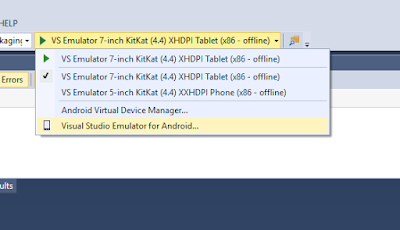
In the above screenshot, you can see I have some emulators already created. Yours will be blank so you need to click on "Visual Studio Emulator for Android...". That will launch the Visual Studio Android Emulator Screen where you can download an "Image" and then run that. I wont go into explaining this as once you see that screen, you will see it is fairly intuitive.
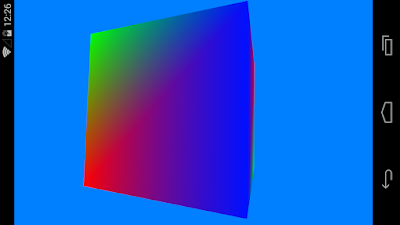
Once everything is ready and the Android emulator is running, you should see a spinning cube displayed like the video below! I have made some changes to the original cube and background:
One more thing to note, you will not be able to use AVD that came with Android Studio while Hyper-V is on. You will have to un-install Hyper-V and reboot. Similarly you need to activate Hyper-V and reboot to use Visual Studio android emulator. You can create a hardware profile for your windows to switch between the two but currently there is no other solution for that.
Thanks and hope you get everything working as I did!
Don't forget to leave comments, suggestions and tips to help me and others along the Android Development adventure!

There is also the case of installing Visual Studio 2015 and finding that your previously installed Android virtual machines under Android Virtual Device manager (AVD Manager) no longer works because HAXM will not load. I covered that here: Intel, Android Emulator, Hyper-V and HAXM. What's going on?
Not only does it cause the above problem, Visual Studio 2015 itself does not work "out of the box" for the C++ Android openGL ES project and it is something I talked about here: "Microsoft And Google: When Worlds Collide"
The typical symptoms of Visual Studio not working are:
- Everything else non Android works.
- Android cross platform VC++ project for openGLES creates the Project OK
- Above project does not compile.
- You get Error from Ant saying it exited with some code.
- You get an error saying CLang.exe could not be located.
- Your Visual Studio Emulator does not launch. May complain about not able to connect to UDP.
First un-install Visual Studio 2015 and all its components. The easiest way is to use "TotalUnInstaller" provided by Microsoft on Git to do it for you. Be aware that this tool will remove "other" visual studio editions listed in its documentation as well.
First download and install the Java JDK. Ant needs tools.jar from it and the latest version at time of this writing is "JDK 8U92" can be installed on any drive with the tools.jar still getting installed.
Which brings me to the point of why not let Visual studio installer install it?
VS2015 installer lists an older version of java and installs it on your C: drive. In the age of expensive SSD's you normally want things installed on your data drive instead. Even the Android SDK and NDK from within Visual Studio is installed on the C: drive and any consequent images you create(which will be fairly large) will go on your C drive. Given that, we have now covered that you should download and install Java JDK yourself.
Next is to un-install Hyper V through control panel/programs and features/"turn windows features on or off". Just un-tick the Hyper V, your PC will need to reboot after it has finished uninstalling Hyper-V.
I am covering INTeL CPU's because that is what I have and thus there is a good reason for doing the above step. You will download and install the Android SDK but that will fail to install the Android Virtual machine as a result of Hyper-V being on. It relies on HAXM which Hyper-V interferes with so HAXM will not install. You should create a Android Emulator and make sure it works before proceeding. If it does not work, you need to sort that out first! Also note that HAXM will not necessarily be installed by default so you will need to go to the SDK directory and start SDK Manager. You can install HAXM from here.

To see the screen above, you will need to download and install Android Studio. Once installed, go to the folder you installed the SDK and launch "SDK Manager".
Select and install HAXM.
Seperately from the SDK, download and install the Android NDK.
You can now start Android Studio and then once you have tested that Android studio works, Re-install Hyper V through the same process as uninstalling it, except this time tick the Hyper-V checkbox. you will need to reboot your system.
Install ANT. which at time of writing was up to 1.9.7.
DO NOT launch Android Studio or Android Emulator after reboot.
Install Visual Studio with all the cross platform option and sub options under that checked. This includes Android development kits.
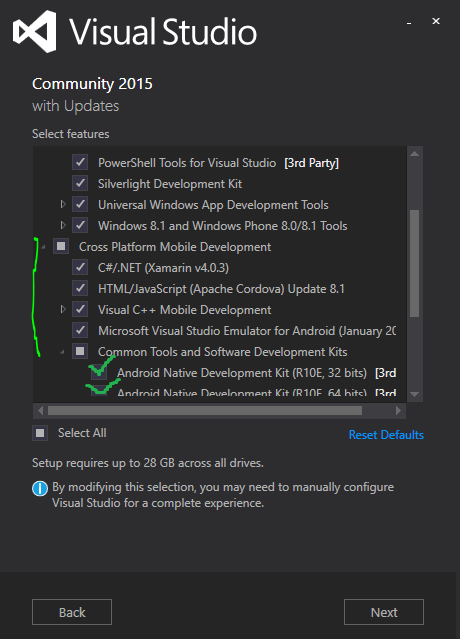
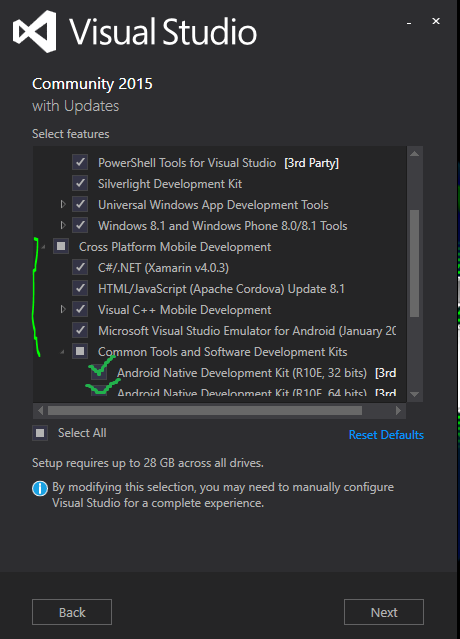

You can install VS in any drive but a fair few files will still be installed on your C drive including the Android SDK. You can remove the Android SDK from VS later but at the moment we are installing it so that if you cannot get it working with the separately installed SDK, you can fall back to using the VS one.
Once Visual studio has intalled, start a VC++ Cross platform project and choose the Android and IOS only option for openGL ES app. SET the debug platform to x86. Do a "Rebuild" on the "[yourappname].Android.Packaging" project (right click, rebuild). If you do not see errors, and rebuild succeeds, you don't need this fix as your one works great out of box. However you are likely to see errors such as "Ant exited with Code 1" or "Unable to locate CLang.exe".
Exit VS and start it up again but remain at the landing page. Click Tools and options. We will now set the Environment paths. Note that you do not have to set this from Windows System option.

Note that While in the above screenshot I am only changing the path to the Android NDK. In actuality, before the screenshot, I changed the other two as well!
Once done, it should look like the screenshot below:
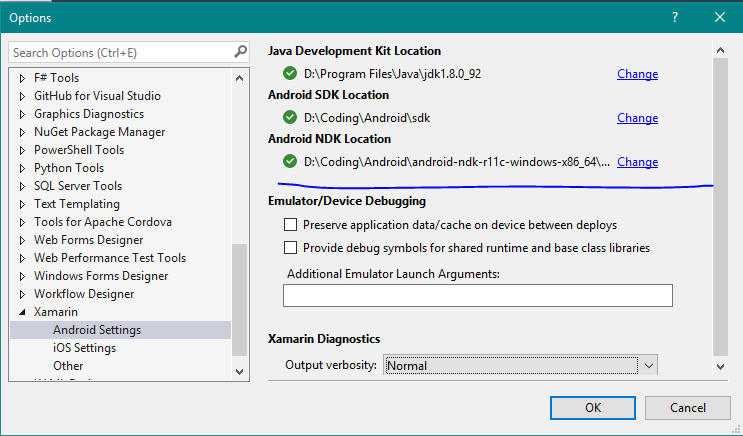
Although I am showing this for the VC++ project, this will fix this for the Xamarin projects running under C# but I thought to show you this since we are in the same screen.
What we actually need to fix now is the paths for VC++ and the Apache Cordova Android SDK paths.

As in the screenshot above, it is found in the branch "Tools for Apache Cordova" and selecting "Environment Variable Overrides"
Fix the ones here so they point to where you have, previously, installed ANT, Android SDK, and Java. The blue X's mark an example of what VS shows if it cannot find your kit.
We now need to fix the Cross platform paths for VC++. Expand the branch for "Cross Platform Tools", then "C++", and finally "Android" as shown in screenshot below:
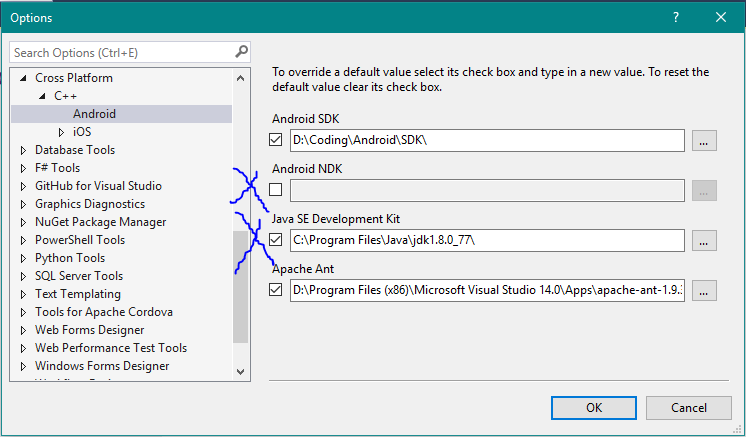
Change all the paths in the screenshot above as needed. The blue X's mark items of particular interest. Firstly the Android NDK is grayed out because VS is using the default one. Place a tick in the checkbox and choose the path where you installed the NDK from earlier. Similarly the Java path is pointing to the old version VS installed so you need to change this to the version you installed earlier.
Next, open the project you created earlier, and Rebuild. If it still gives an error regarding ANT then you may need to manually change the Android Manifest file. You will need to change the Version to the SDK Version you have installed through the SDK Manager. Such as version 19 -which is what I am using.

Change the version appropriately as in the above screenshot marked with arrow and underline.
For the heads up on this being the SDK version not the target version, thanks go to Robert Donaldson. Hours of madness solved in a minute, thanks Robert!
The project should successfully rebuild now. If it fails, you may not have the latest Visual Studio Apache Cordova update. In this case look at your VS notifications and it should be listed there as an update (the purple flag on the top right of your Visual Studio Window). Install the update and re-launch your project. It should build then.
Next step is to create the Visual Studio emulator so that you can run your application; which by default is the spinning cube.

In the above screenshot, you can see I have some emulators already created. Yours will be blank so you need to click on "Visual Studio Emulator for Android...". That will launch the Visual Studio Android Emulator Screen where you can download an "Image" and then run that. I wont go into explaining this as once you see that screen, you will see it is fairly intuitive.
Once everything is ready and the Android emulator is running, you should see a spinning cube displayed like the video below! I have made some changes to the original cube and background:
One more thing to note, you will not be able to use AVD that came with Android Studio while Hyper-V is on. You will have to un-install Hyper-V and reboot. Similarly you need to activate Hyper-V and reboot to use Visual Studio android emulator. You can create a hardware profile for your windows to switch between the two but currently there is no other solution for that.
Thanks and hope you get everything working as I did!
Don't forget to leave comments, suggestions and tips to help me and others along the Android Development adventure!
Subscribe to:
Posts
(
Atom
)